Pod Lifecycle
This page describes the lifecycle of a Pod. Pods follow a defined lifecycle, starting
in the Pending phase, moving through Running if at least one
of its primary containers starts OK, and then through either the Succeeded or
Failed phases depending on whether any container in the Pod terminated in failure.
While a Pod runs, the kubelet manages containers and translates the Pod's spec for the container runtime. The kubelet also manages executing probes that track the health of your application.
Like individual application containers, Pods are considered to be relatively ephemeral (rather than durable) entities. Pods are created, assigned a unique ID (UID), and scheduled to run on nodes where they remain until termination (according to restart policy) or deletion. If a Node dies, the Pods running on (or scheduled to run on) that node are marked for deletion. The control plane marks the Pods for removal after a timeout period.
Pod lifetime
Whilst a Pod is running, the kubelet is able to restart containers to handle
some kind of faults. Within a Pod, Kubernetes tracks different container
states and determines what action to take to make the Pod
healthy again. This is done in a polling
loop that periodically reconciles the
desired state (a Pod spec) with the actual state of the running containers.
Because of this polling mechanism, the status seen in the API (like kubectl get pod) might have a slight delay compared to the instant reality on the node.
In the Kubernetes API, Pods have both a specification and an actual status. The status for a Pod object consists of a set of Pod conditions. You can also inject custom readiness information into the condition data for a Pod, if that is useful to your application.
Pods are only scheduled once in their lifetime; assigning a Pod to a specific node is called binding, and the process of selecting which node to use is called scheduling. Once a Pod has been scheduled and is bound to a node, Kubernetes tries to run that Pod on the node. The Pod runs on that node until it stops, or until the Pod is terminated; if Kubernetes isn't able to start the Pod on the selected node (for example, if the node crashes before the Pod starts), then that particular Pod never starts.
You can use Pod Scheduling Readiness to delay scheduling for a Pod until all its scheduling gates are removed. For example, you might want to define a set of Pods but only trigger scheduling once all the Pods have been created.
Pods and fault recovery
If one of the containers in the Pod fails, then Kubernetes may try to restart that specific container. Read How Pods handle problems with containers to learn more.
Pods can however fail in a way that the cluster cannot recover from, and in that case Kubernetes does not attempt to heal the Pod further; instead, Kubernetes deletes the Pod and relies on other components to provide automatic healing.
If a Pod is scheduled to a node and that node then fails, the Pod is treated as unhealthy and Kubernetes eventually deletes the Pod. A Pod won't survive an eviction due to a lack of resources or Node maintenance.
Kubernetes uses a higher-level abstraction, called a controller, that handles the work of managing the relatively disposable Pod instances.
A given Pod (as defined by a UID) is never "rescheduled" to a different node; instead,
that Pod can be replaced by a new, near-identical Pod. If you make a replacement Pod, it can
even have same name (as in .metadata.name) that the old Pod had, but the replacement
would have a different .metadata.uid from the old Pod.
Kubernetes does not guarantee that a replacement for an existing Pod would be scheduled to the same node as the old Pod that was being replaced.
Associated lifetimes
When something is said to have the same lifetime as a Pod, such as a volume, that means that the thing exists as long as that specific Pod (with that exact UID) exists. If that Pod is deleted for any reason, and even if an identical replacement is created, the related thing (a volume, in this example) is also destroyed and created anew.
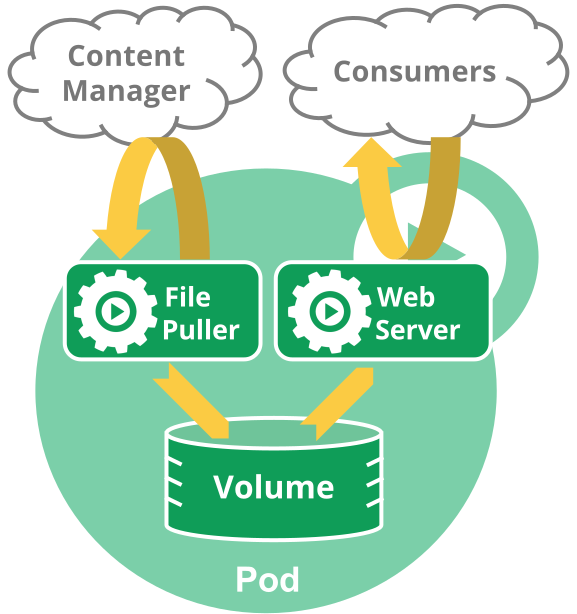
Figure 1.
A multi-container Pod that contains a file puller sidecar and a web server. The Pod uses an ephemeral emptyDir volume for shared storage between the containers.
Pod phase
A Pod's status field is a
PodStatus
object, which has a phase field.
The phase of a Pod is a simple, high-level summary of where the Pod is in its lifecycle. The phase is not intended to be a comprehensive rollup of observations of container or Pod state, nor is it intended to be a comprehensive state machine.
The number and meanings of Pod phase values are tightly guarded.
Other than what is documented here, nothing should be assumed about Pods that
have a given phase value.
Here are the possible values for phase:
| Value | Description |
|---|---|
Pending |
The Pod has been accepted by the Kubernetes cluster, but one or more of the containers has not been set up and made ready to run. This includes time a Pod spends waiting to be scheduled as well as the time spent downloading container images over the network. |
Running |
The Pod has been bound to a node, and all of the containers have been created. At least one container is still running, or is in the process of starting or restarting. |
Succeeded |
All containers in the Pod have terminated in success, and will not be restarted. |
Failed |
All containers in the Pod have terminated, and at least one container has terminated in failure. That is, the container either exited with non-zero status or was terminated by the system, and is not set for automatic restarting. |
Unknown |
For some reason the state of the Pod could not be obtained. This phase typically occurs due to an error in communicating with the node where the Pod should be running. |
Note:
When a pod is failing to start repeatedly, CrashLoopBackOff may appear in the Status field of some kubectl commands.
Similarly, when a pod is being deleted, Terminating may appear in the Status field of some kubectl commands.
Make sure not to confuse Status, a kubectl display field for user intuition, with the pod's phase.
Pod phase is an explicit part of the Kubernetes data model and of the
Pod API.
  NAMESPACE               NAME               READY   STATUS             RESTARTS   AGE
  alessandras-namespace   alessandras-pod    0/1     CrashLoopBackOff   200        2d9h
A Pod is granted a term to terminate gracefully, which defaults to 30 seconds.
You can use the flag --force to terminate a Pod by force.
Since Kubernetes 1.27, the kubelet transitions deleted Pods to a terminal phase
(Failed or Succeeded depending on the exit statuses of the pod containers)
before their deletion from the API server, with two exceptions:
- static Pods (which are managed directly by the kubelet and represented by mirror Pods)
- force-deleted Pods without a finalizer
If a node dies or is disconnected from the rest of the cluster, Kubernetes
applies a policy for setting the phase of all Pods on the lost node to Failed.
Container states
As well as the phase of the Pod overall, Kubernetes tracks the state of each container inside a Pod. You can use container lifecycle hooks to trigger events to run at certain points in a container's lifecycle.
Once the scheduler
assigns a Pod to a Node, the kubelet starts creating containers for that Pod
using a container runtime.
There are three possible container states: Waiting, Running, and Terminated.
To check the state of a Pod's containers, you can use
kubectl describe pod <name-of-pod>. The output shows the state for each container
within that Pod.
Each state has a specific meaning:
Waiting
If a container is not in either the Running or Terminated state, it is Waiting.
A container in the Waiting state is still running the operations it requires in
order to complete start up: for example, pulling the container image from a container
image registry, or applying Secret
data.
When you use kubectl to query a Pod with a container that is Waiting, you also see
a Reason field to summarize why the container is in that state.
Running
The Running status indicates that a container is executing without issues. If there
was a postStart hook configured, it has already executed and finished. When you use
kubectl to query a Pod with a container that is Running, you also see information
about when the container entered the Running state.
Terminated
A container in the Terminated state began execution and then either ran to
completion or failed for some reason. When you use kubectl to query a Pod with
a container that is Terminated, you see a reason, an exit code, and the start and
finish time for that container's period of execution.
If a container has a preStop hook configured, this hook runs before the container enters
the Terminated state.
How Pods handle problems with containers
Kubernetes manages container failures within Pods using a restartPolicy defined
in the Pod spec. This policy determines how Kubernetes reacts to containers
exiting due to errors or other reasons.
The spec of a Pod has a restartPolicy field with possible values Always,
OnFailure, and Never. The default value is Always. When a container exits,
the kubelet restarts it with an exponential backoff delay (10s, 20s, 40s, …),
capped at 300 seconds (5 minutes). Once a container has executed for 10 minutes
without any problems, the kubelet resets the backoff timer.
For details on restart policies, container-level restart rules, and backoff delay customization, see Container Restarts.
Pod conditions
A Pod has a PodStatus, which has an array of PodConditions through which the Pod has or has not passed. The kubelet manages the following PodConditions:
PodScheduled: the Pod has been scheduled to a node.PodReadyToStartContainers: (beta feature; enabled by default) the Pod sandbox has been successfully created and networking configured.ContainersReady: all containers in the Pod are ready.Initialized: all init containers have completed successfully.Ready: the Pod is able to serve requests and should be added to the load balancing pools of all matching Services.DisruptionTarget: the pod is about to be terminated due to a disruption (such as preemption, eviction or garbage-collection).PodResizePending: a pod resize was requested but cannot be applied. See Pod resize status.PodResizeInProgress: the pod is in the process of resizing. See Pod resize status.
| Field name | Description |
|---|---|
type |
Name of this Pod condition. |
status |
Indicates whether that condition is applicable, with possible values "True", "False", or "Unknown". |
lastProbeTime |
Timestamp of when the Pod condition was last probed. |
lastTransitionTime |
Timestamp for when the Pod last transitioned from one status to another. |
reason |
Machine-readable, UpperCamelCase text indicating the reason for the condition's last transition. |
message |
Human-readable message indicating details about the last status transition. |
Pod readiness
FEATURE STATE:
Kubernetes v1.14 [stable]
Your application can inject extra feedback or signals into PodStatus:
Pod readiness. To use this, set readinessGates in the Pod's spec to
specify a list of additional conditions that the kubelet evaluates for Pod readiness.
Readiness gates are determined by the current state of status.condition
fields for the Pod. If Kubernetes cannot find such a condition in the
status.conditions field of a Pod, the status of the condition
is defaulted to "False".
Here is an example:
kind: Pod
...
spec:
  readinessGates:
    - conditionType: "www.example.com/feature-1"
status:
  conditions:
    - type: Ready                              # a built-in PodCondition
      status: "False"
      lastProbeTime: null
      lastTransitionTime: 2018-01-01T00:00:00Z
    - type: "www.example.com/feature-1"        # an extra PodCondition
      status: "False"
      lastProbeTime: null
      lastTransitionTime: 2018-01-01T00:00:00Z
  containerStatuses:
    - containerID: docker://abcd...
      ready: true
...
The Pod conditions you add must have names that meet the Kubernetes label key format.
Status for Pod readiness
The kubectl patch command does not support patching object status.
To set these status.conditions for the Pod, applications and
operators should use
the PATCH action.
You can use a Kubernetes client library to
write code that sets custom Pod conditions for Pod readiness.
For a Pod that uses custom conditions, that Pod is evaluated to be ready only when both the following statements apply:
- All containers in the Pod are ready.
- All conditions specified in
readinessGatesareTrue.
When a Pod's containers are Ready but at least one custom condition is missing or
False, the kubelet sets the Pod's condition to ContainersReady.
Pod network readiness
FEATURE STATE:
Kubernetes v1.29 [beta]
Note:
During its early development, this condition was namedPodHasNetwork.After a Pod gets scheduled on a node, it needs to be admitted by the kubelet and
to have any required storage volumes mounted. Once these phases are complete,
the kubelet works with
a container runtime (using Container Runtime Interface (CRI)) to set up a
runtime sandbox and configure networking for the Pod. If the
PodReadyToStartContainersCondition
feature gate is enabled
(it is enabled by default for Kubernetes 1.35), the
PodReadyToStartContainers condition will be added to the status.conditions field of a Pod.
The PodReadyToStartContainers condition is set to False by the kubelet when it detects a
Pod does not have a runtime sandbox with networking configured. This occurs in
the following scenarios:
- Early in the lifecycle of the Pod, when the kubelet has not yet begun to set up a sandbox for the Pod using the container runtime.
- Later in the lifecycle of the Pod, when the Pod sandbox has been destroyed due to either:
- the node rebooting, without the Pod getting evicted
- for container runtimes that use virtual machines for isolation, the Pod sandbox virtual machine rebooting, which then requires creating a new sandbox and fresh container network configuration.
The PodReadyToStartContainers condition is set to True by the kubelet after the
successful completion of sandbox creation and network configuration for the Pod
by the runtime plugin. The kubelet can start pulling container images and create
containers after PodReadyToStartContainers condition has been set to True.
For a Pod with init containers, the kubelet sets the Initialized condition to
True after the init containers have successfully completed (which happens
after successful sandbox creation and network configuration by the runtime
plugin). For a Pod without init containers, the kubelet sets the Initialized
condition to True before sandbox creation and network configuration starts.
Resizing Pods
FEATURE STATE:
Kubernetes v1.35 [stable](enabled by default)Kubernetes supports changing the CPU and memory resources allocated to Pods after they are created. (For other infrastructure resources, you would need to use different techniques specific to those resources.) There are two main approaches to resizing CPU and memory:
In-place Pod resize
You can resize a Pod's container-level CPU and memory resources without recreating the Pod. This is also called in-place Pod vertical scaling. This allows you to adjust resource allocation for running containers while potentially avoiding application disruption.
To perform an in-place resize, you update the Pod's desired state using the /resize
subresource. The kubelet then attempts to apply the new resource values to the running
containers. The Pod conditions
PodResizePending and PodResizeInProgress (described in Pod conditions)
indicate the status of the resize operation. For more details about resize status, see
Container Resize Status.
Key considerations for in-place resize:
- Only CPU and memory resources can be resized in-place.
- The Pod's Quality of Service (QoS) class is determined at creation and cannot be changed by resizing.
- You can configure whether a container restart is required for the resize using
resizePolicyin the container specification.
For detailed instructions on performing in-place resize, see Resize CPU and Memory Resources assigned to Containers.
Resizing by launching replacement Pods
The more cloud native approach to changing a Pod's resources is through the workload resource that manages it (such as a Deployment or StatefulSet). When you update the resource specifications in the Pod template, the workload's controller creates new Pods with the updated resources and terminates the old Pods according to its update strategy.
This approach:
- Works with any Kubernetes version.
- Can change any Pod specification, not just resources.
- Results in Pod replacement, so you should design your workload to handle planned disruptions. Consider using a PodDisruptionBudget to control availability.
- Requires that your Pods are managed by a workload resource.
You can also use a VerticalPodAutoscaler to automatically manage Pod resource recommendations and updates.
Container probes
A probe is a diagnostic performed periodically by the kubelet on a container. To perform a diagnostic, the kubelet either executes code within the container, or makes a network request.
Check mechanisms
There are four different ways to check a container using a probe. Each probe must define exactly one of these four mechanisms:
exec- Executes a specified command inside the container. The diagnostic is considered successful if the command exits with a status code of 0.
grpc- Performs a remote procedure call using gRPC.
The target should implement
gRPC health checks.
The diagnostic is considered successful if the
statusof the response isSERVING. httpGet- Performs an HTTP
GETrequest against the Pod's IP address on a specified port and path. The diagnostic is considered successful if the response has a status code greater than or equal to 200 and less than 400. See Configure Probes for more information on how the kubelet follows redirects. tcpSocket- Performs a TCP check against the Pod's IP address on a specified port. The diagnostic is considered successful if the port is open. If the remote system (the container) closes the connection immediately after it opens, this counts as healthy.
Caution:
Unlike the other mechanisms,exec probe's implementation involves
the creation/forking of multiple processes each time when executed.
As a result, in case of the clusters having higher pod densities,
lower intervals of initialDelaySeconds, periodSeconds,
configuring any probe with exec mechanism might introduce an overhead on the cpu usage of the node.
In such scenarios, consider using the alternative probe mechanisms to avoid the overhead.Probe outcome
Each probe has one of three results:
Success- The container passed the diagnostic.
Failure- The container failed the diagnostic.
Unknown- The diagnostic failed (no action should be taken, and the kubelet will make further checks).
Types of probe
The kubelet can optionally perform and react to three kinds of probes on running containers:
livenessProbe- Indicates whether the container is running. If
the liveness probe fails, the kubelet kills the container, and the container
is subjected to its restart policy. If a container does not
provide a liveness probe, the default state is
Success. readinessProbe- Indicates whether the container is ready to respond to requests.
If the readiness probe fails, the EndpointSlice
controller removes the Pod's IP address from the EndpointSlices of all Services that match the Pod.
The default state of readiness before the initial delay is
Failure. If a container does not provide a readiness probe, the default state isSuccess. startupProbe- Indicates whether the application within the container is started.
All other probes are disabled if a startup probe is provided, until it succeeds.
If the startup probe fails, the kubelet kills the container, and the container
is subjected to its restart policy. If a container does not
provide a startup probe, the default state is
Success.
For more information about how to set up a liveness, readiness, or startup probe, see Configure Liveness, Readiness and Startup Probes.
When should you use a liveness probe?
If the process in your container is able to crash on its own whenever it
encounters an issue or becomes unhealthy, you do not necessarily need a liveness
probe; the kubelet will automatically perform the correct action in accordance
with the Pod's restartPolicy.
If you'd like your container to be killed and restarted if a probe fails, then
specify a liveness probe, and specify a restartPolicy of Always or OnFailure.
When should you use a readiness probe?
If you'd like to start sending traffic to a Pod only when a probe succeeds, specify a readiness probe. In this case, the readiness probe might be the same as the liveness probe, but the existence of the readiness probe in the spec means that the Pod will start without receiving any traffic and only start receiving traffic after the probe starts succeeding.
If you want your container to be able to take itself down for maintenance, you can specify a readiness probe that checks an endpoint specific to readiness that is different from the liveness probe.
If your app has a strict dependency on back-end services, you can implement both a liveness and a readiness probe. The liveness probe passes when the app itself is healthy, but the readiness probe additionally checks that each required back-end service is available. This helps you avoid directing traffic to Pods that can only respond with error messages.
If your container needs to work on loading large data, configuration files, or migrations during startup, you can use a startup probe. However, if you want to detect the difference between an app that has failed and an app that is still processing its startup data, you might prefer a readiness probe.
Note:
If you want to be able to drain requests when the Pod is deleted, you do not necessarily need a readiness probe; when the Pod is deleted, the corresponding endpoint in theEndpointSlice will update its conditions:
the endpoint ready condition will be set to false, so load balancers
will not use the Pod for regular traffic. See Pod termination
for more information about how the kubelet handles Pod deletion.When should you use a startup probe?
Startup probes are useful for Pods that have containers that take a long time to come into service. Rather than set a long liveness interval, you can configure a separate configuration for probing the container as it starts up, allowing a time longer than the liveness interval would allow.
If your container usually starts in more than
\( initialDelaySeconds + failureThreshold \times periodSeconds \), you should specify a
startup probe that checks the same endpoint as the liveness probe. The default for
periodSeconds is 10s. You should then set its failureThreshold high enough to
allow the container to start, without changing the default values of the liveness
probe. This helps to protect against deadlocks.
Termination of Pods
Because Pods represent processes running on nodes in the cluster, it is important to
allow those processes to gracefully terminate when they are no longer needed (rather
than being abruptly stopped with a KILL signal and having no chance to clean up).
The design aim is for you to be able to request deletion and know when processes terminate, but also be able to ensure that deletes eventually complete. When you request deletion of a Pod, the cluster records and tracks the intended grace period before the Pod is allowed to be forcefully killed. With that forceful shutdown tracking in place, the kubelet attempts graceful shutdown.
Typically, with this graceful termination of the pod, kubelet makes requests to the container runtime
to attempt to stop the containers in the pod by first sending a TERM (aka. SIGTERM) signal,
with a grace period timeout, to the main process in each container.
The requests to stop the containers are processed by the container runtime asynchronously.
There is no guarantee to the order of processing for these requests.
Many container runtimes respect the STOPSIGNAL value defined in the container image and,
if different, send the container image configured STOPSIGNAL instead of TERM.
Once the grace period has expired, the KILL signal is sent to any remaining
processes, and the Pod is then deleted from the
API Server. If the kubelet or the
container runtime's management service is restarted while waiting for processes to terminate, the
cluster retries from the start including the full original grace period.
Stop Signals
The stop signal used to kill the container can be defined in the container image with the STOPSIGNAL instruction.
If no stop signal is defined in the image, the default signal of the container runtime
(SIGTERM for both containerd and CRI-O) would be used to kill the container.
Defining custom stop signals
FEATURE STATE:
Kubernetes v1.33 [alpha](disabled by default)If the ContainerStopSignals feature gate is enabled, you can configure a custom stop signal
for your containers from the container Lifecycle. We require the Pod's spec.os.name field
to be present as a requirement for defining stop signals in the container lifecycle.
The list of signals that are valid depends on the OS the Pod is scheduled to.
For Pods scheduled to Windows nodes, we only support SIGTERM and SIGKILL as valid signals.
Here is an example Pod spec defining a custom stop signal:
spec:
  os:
    name: linux
  containers:
    - name: my-container
      image: container-image:latest
      lifecycle:
        stopSignal: SIGUSR1
If a stop signal is defined in the lifecycle, this will override the signal defined in the container image. If no stop signal is defined in the container spec, the container would fall back to the default behavior.
Pod Termination Flow
Pod termination flow, illustrated with an example:
-
You use the
kubectltool to manually delete a specific Pod, with the default grace period (30 seconds). -
The Pod in the API server is updated with the time beyond which the Pod is considered "dead" along with the grace period. If you use
kubectl describeto check the Pod you're deleting, that Pod shows up as "Terminating". On the node where the Pod is running: as soon as the kubelet sees that a Pod has been marked as terminating (a graceful shutdown duration has been set), the kubelet begins the local Pod shutdown process.-
If one of the Pod's containers has defined a
preStophook and theterminationGracePeriodSecondsin the Pod spec is not set to 0, the kubelet runs that hook inside of the container. The defaultterminationGracePeriodSecondssetting is 30 seconds.If the
preStophook is still running after the grace period expires, the kubelet requests a small, one-off grace period extension of 2 seconds.
Note:
If thepreStophook needs longer to complete than the default grace period allows, you must modifyterminationGracePeriodSecondsto suit this.-
The kubelet triggers the container runtime to send a TERM signal to process 1 inside each container.
There is special ordering if the Pod has any sidecar containers defined. Otherwise, the containers in the Pod receive the TERM signal at different times and in an arbitrary order. If the order of shutdowns matters, consider using a
preStophook to synchronize (or switch to using sidecar containers).
-
-
At the same time as the kubelet is starting graceful shutdown of the Pod, the control plane evaluates whether to remove that shutting-down Pod from EndpointSlice objects, where those objects represent a Service with a configured selector. ReplicaSets and other workload resources no longer treat the shutting-down Pod as a valid, in-service replica.
Pods that shut down slowly should not continue to serve regular traffic and should start terminating and finish processing open connections. Some applications need to go beyond finishing open connections and need more graceful termination, for example, session draining and completion.
Any endpoints that represent the terminating Pods are not immediately removed from EndpointSlices, and a status indicating terminating state is exposed from the EndpointSlice API. Terminating endpoints always have their
readystatus asfalse(for backward compatibility with versions before 1.26), so load balancers will not use it for regular traffic.If traffic draining on terminating Pod is needed, the actual readiness can be checked as a condition
serving. You can find more details on how to implement connections draining in the tutorial Pods And Endpoints Termination Flow -
The kubelet ensures the Pod is shut down and terminated
- When the grace period expires, if there is still any container running in the Pod, the
kubelet triggers forcible shutdown.
The container runtime sends
SIGKILLto any processes still running in any container in the Pod. The kubelet also cleans up a hiddenpausecontainer if that container runtime uses one. - The kubelet transitions the Pod into a terminal phase (
FailedorSucceededdepending on the end state of its containers). - The kubelet triggers forcible removal of the Pod object from the API server, by setting grace period to 0 (immediate deletion).
- The API server deletes the Pod's API object, which is then no longer visible from any client.
- When the grace period expires, if there is still any container running in the Pod, the
kubelet triggers forcible shutdown.
The container runtime sends
Forced Pod termination
Caution:
Forced deletions can be potentially disruptive for some workloads and their Pods.By default, all deletes are graceful within 30 seconds. The kubectl delete command supports
the --grace-period=<seconds> option which allows you to override the default and specify your
own value.
Setting the grace period to 0 forcibly and immediately deletes the Pod from the API
server. If the Pod was still running on a node, that forcible deletion triggers the kubelet to
begin immediate cleanup.
Using kubectl, You must specify an additional flag --force along with --grace-period=0
in order to perform force deletions.
When a force deletion is performed, the API server does not wait for confirmation from the kubelet that the Pod has been terminated on the node it was running on. It removes the Pod in the API immediately so a new Pod can be created with the same name. On the node, Pods that are set to terminate immediately will still be given a small grace period before being force killed.
Caution:
Immediate deletion does not wait for confirmation that the running resource has been terminated. The resource may continue to run on the cluster indefinitely.If you need to force-delete Pods that are part of a StatefulSet, refer to the task documentation for deleting Pods from a StatefulSet.
Pod shutdown and sidecar containers
If your Pod includes one or more
sidecar containers
(init containers with an Always restart policy), the kubelet will delay sending
the TERM signal to these sidecar containers until the last main container has fully terminated.
The sidecar containers will be terminated in the reverse order they are defined in the Pod spec.
This ensures that sidecar containers continue serving the other containers in the Pod until they
are no longer needed.
This means that slow termination of a main container will also delay the termination of the sidecar containers. If the grace period expires before the termination process is complete, the Pod may enter forced termination. In this case, all remaining containers in the Pod will be terminated simultaneously with a short grace period.
Similarly, if the Pod has a preStop hook that exceeds the termination grace period, emergency termination may occur.
In general, if you have used preStop hooks to control the termination order without sidecar containers, you can now
remove them and allow the kubelet to manage sidecar termination automatically.
Garbage collection of Pods
For failed Pods, the API objects remain in the cluster's API until a human or controller process explicitly removes them.
The Pod garbage collector (PodGC), which is a controller in the control plane, cleans up
terminated Pods (with a phase of Succeeded or Failed), when the number of Pods exceeds the
configured threshold (determined by terminated-pod-gc-threshold in the kube-controller-manager).
This avoids a resource leak as Pods are created and terminated over time.
Additionally, PodGC cleans up any Pods which satisfy any of the following conditions:
- are orphan Pods - bound to a node which no longer exists,
- are unscheduled terminating Pods,
- are terminating Pods, bound to a non-ready node tainted with
node.kubernetes.io/out-of-service.
Along with cleaning up the Pods, PodGC will also mark them as failed if they are in a non-terminal phase. Also, PodGC adds a Pod disruption condition when cleaning up an orphan Pod. See Pod disruption conditions for more details.
Pod behavior during kubelet restarts
If you restart the kubelet, Pods (and their containers) continue to run
even during the restart.
When there are running Pods on a node, stopping or restarting the kubelet
on that node does not cause the kubelet to stop all local Pods
before the kubelet itself stops.
To stop the Pods on a node, you can use kubectl drain.
Detection of kubelet restarts
FEATURE STATE:
Kubernetes v1.35 [deprecated](disabled by default)When the kubelet starts, it checks to see if there is already a Node with bound Pods.
If the Node's Ready condition remains unchanged,
in other words the condition has not transitioned from true to false, Kubernetes detects this a kubelet restart.
(It's possible to restart the kubelet in other ways, for example to fix a node bug,
but in these cases, Kubernetes picks the safe option and treats this as if you
stopped the kubelet and then later started it).
When the kubelet restarts, the container statuses are managed differently based on the feature gate setting:
-
By default, the kubelet does not change container statuses after a restart. Containers that were in set to
ready: truestate remain remain ready.If you stop the kubelet long enough for it to fail a series of node heartbeat checks, and then you wait before you start the kubelet again, Kubernetes may begin to evict Pods from that Node. However, even though Pod evictions begin to happen, Kubernetes does not mark the individual containers in those Pods as
ready: false. The Pod-level eviction happens after the control plane taints the node asnode.kubernetes.io/not-ready(due to the failed heartbeats). -
In Kubernetes 1.35 you can opt in to a legacy behavior where the kubelet always modify the containers
readyvalue, after a kubelet restart, to be false.This legacy behavior was the default for a long time, but caused issue for people using Kubernetes, especially in large scale deployments. Although the feature gate allows reverting to this legacy behavior temporarily, the Kubernetes project recommends that you file a bug report if you encounter problems. The
ChangeContainerStatusOnKubeletRestartfeature gate will be removed in the future.
What's next
-
Get hands-on experience attaching handlers to container lifecycle events.
-
Get hands-on experience configuring Liveness, Readiness and Startup Probes.
-
Learn more about container lifecycle hooks.
-
Learn more about sidecar containers.
-
For detailed information about Pod and container status in the API, see the API reference documentation covering
statusfor Pod.
Last modified April 18, 2026 at 5:57 PM PST: add container restarts concept page (3fa18331ae)